CSS Nth Child Generator: Select Every Nth Element with An+B Formulas
A practical guide to the CSS Nth Child Generator — build, preview, and copy :nth-child, :nth-of-type, and An+B selector formulas against a live element grid, right in your browser.
Free Interactive Tool
CSS :nth-child() Generator
Build and preview CSS :nth-child, :nth-of-type, and An+B formulas against a live grid. Copy the selector. 100% in your browser.
Table of Contents
Everyone has typed some version of "how to select every 3rd item in CSS" into a search box, and the answer has existed for two decades: the An+B formula. It keeps sending people to search results because the notation looks like algebra until someone reads it aloud — 3n+1 simply means "every 3rd element, starting at the 1st" — and then it suddenly feels obvious. The free CSS Nth Child Generator closes that gap permanently: it turns your plain-language intent into a precise selector and shows exactly which elements match before anything reaches your stylesheet.
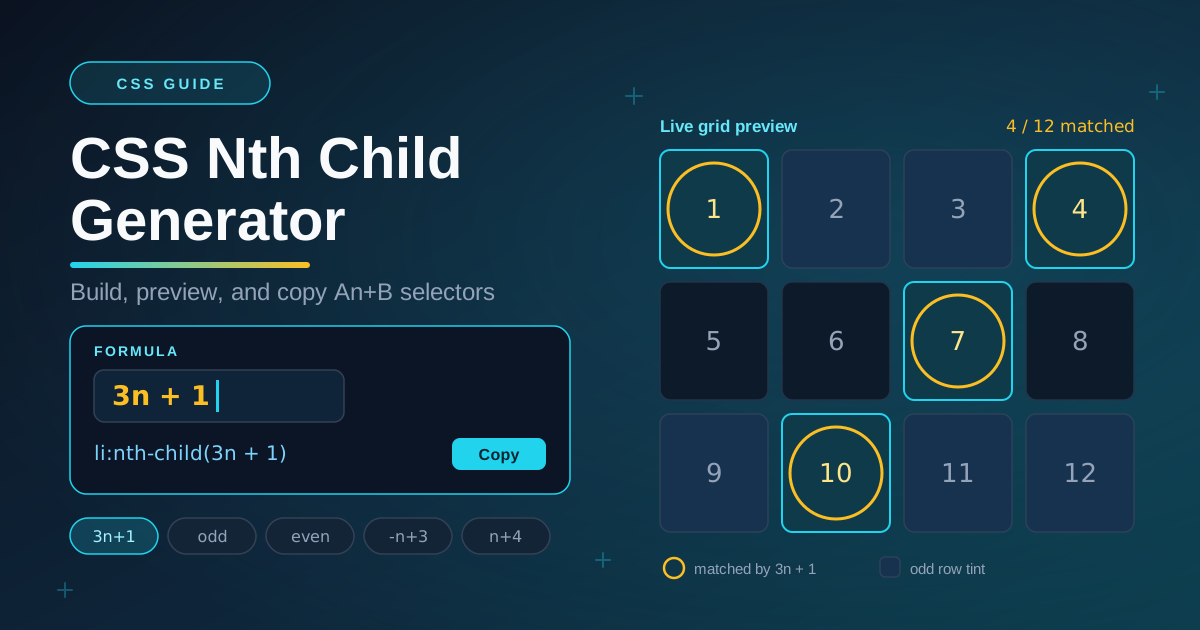
The tool is a compact playground built around one idea. You type or pick an An+B formula, choose between :nth-child, :nth-of-type, :nth-last-child, or :nth-last-of-type, and a live grid of numbered elements instantly rings the cells your formula selects. Drag the item count up and down to stress-test the pattern, edit the highlight rule to preview real styling, and copy the finished CSS with one click. Everything runs 100% client-side in your browser — nothing is uploaded and no account is required.
In this guide you will learn why the generator earns a place in your workflow, how each control works, how to read any An+B formula like a sentence, and where selective styling genuinely pays off in production projects.
Why Use CSS Nth Child Generator?
- It ends the recurring "every nth" search — instead of re-googling the same recipe every few months, you experiment until the notation clicks. Seeing 3n+1, -n+3, and n+5 light up a visible grid teaches An+B faster than any cheat sheet.
- Live grid feedback removes all guesswork — selectors are invisible until a page renders. The generator rings matched cells the moment you type, so mistakes surface in seconds rather than after a save-build-refresh cycle.
- Presets cover the patterns you actually use — odd, even, first element, every 3rd, first three, and from the 4th onward are one click away, which is honest coverage for the majority of real-world styling rules.
- All four positional pseudo-classes are supported — :nth-child, :nth-of-type, :nth-last-child, and :nth-last-of-type behave differently in mixed markup, and switching between them in one view makes the difference concrete.
- Copy-ready output — the generated rule includes your base selector, the pseudo-class with its formula, and a sample declaration block, so it is paste-and-go instead of paste-and-fix.
- Private, instant, and free — the entire tool runs client-side. No signup, no uploads, no waiting, and it works the same on a laptop or a phone.
Key Features
| Feature | What it does |
|---|---|
| Formula input | Accepts any An+B expression, including keywords like odd and even, single position numbers, and signed formulas such as -n+3 |
| Preset chips | One-click formulas for odd, even, first (1), every 3rd (3n+1), first three (-n+3), and from the 4th (n+4) |
| Pseudo-class selector | Switches between :nth-child, :nth-of-type, :nth-last-child, and :nth-last-of-type |
| Base selector field | Wraps the formula in your element, class, or compound selector, such as li or .card |
| Item count slider | Renders between 1 and 48 numbered elements so you can test short lists, edge cases, and long collections |
| Highlight rule editor | Lets you edit the sample declarations applied to matched cells so the preview looks like the finished styling |
| Live match grid | Rings every matching element and updates as you type, making the selection impossible to misread |
| Copy button | Copies the complete generated rule to your clipboard in one click |
A few details deserve a call-out. The parser is deliberately strict: if your input cannot be interpreted as a valid An+B expression, the grid shows no matches and the generated rule is held back, which stops you from copying a broken selector into production. The of S syntax is supported as well, so you can express rules like "the 2nd element that also matches .featured" — something a plain nth formula cannot say on its own.
How to Use
- Open the tool. Visit the CSS Nth Child Generator — it loads instantly in any modern browser with no installation or setup.
- Choose the pseudo-class and base selector. Start with :nth-child and li, then adjust both to mirror your real markup — for example .menu-item with :nth-of-type when your container mixes element types.
- Enter or pick an An+B formula. Type 3n+1 directly into the formula field, or click a preset chip such as odd, -n+3, or n+4 and watch the grid re-ring its cells.
- Read the grid and stress-test it. Count the rings, then drag the item count slider up and down to confirm the pattern still selects what you intend when the list grows or shrinks.
- Tune the highlight and copy the rule. Edit the sample declarations to preview the visual result, click Copy, and paste the finished selector straight into your stylesheet.
The whole loop takes under a minute, which is exactly the point: the faster you can see a formula's effect, the sooner you can trust it in production.
Reading An+B Like a Sentence
The An+B micro-language has only three parts. A is the stride — how many positions to jump each round. n is a counter that takes the values 0, 1, 2, 3, and so on. B is the starting offset — where the counting begins. Put together, 3n+1 reads as "every 3rd element, starting at the 1st": with n = 0 you get position 1, with n = 1 position 4, then 7, 10, and onward. Once you adopt that reading habit, every common recipe becomes self-describing:
- odd (the same as 2n+1) — every 2nd element starting at the 1st: positions 1, 3, 5, 7 and so on
- even (the same as 2n) — every 2nd element starting at the 2nd: positions 2, 4, 6, 8 and so on
- 3n — every 3rd element starting at the 3rd: positions 3, 6, 9 and so on
- -n+3 — counting backwards from 3: exactly the first three elements
- n+5 — from the 5th element through the end of the list
- 4 — one fixed position, the equivalent of :nth-child(4)
One distinction trips people up in real markup: :nth-child counts all siblings, while :nth-of-type counts only siblings of the same element type. If an article holds three headings and five paragraphs, .post p:nth-child(4) inspects the fourth child whatever it is, whereas .post p:nth-of-type(2) inspects the second paragraph specifically. Neither is wrong — they answer different questions — and flipping between the two modes in the generator shows you immediately which one matches your intent.
Zero-match cases are just as worth understanding. 4n+9 needs a 9th element before it can match anything, so against an eight-item list it rings nothing at all. Negative strides run out too: -2n+5 selects positions 5, 3, and 1 and then stops. This is where the live grid preview earns its keep — you see the emptiness instantly instead of shipping a rule that silently does nothing, and dragging the item count upward reveals the minimum list length your formula actually needs.
Practical Use Cases
Zebra Stripes for Tables and Lists
Alternating row tints remain the most-deployed nth rule on the web. A single tr:nth-child(odd) declaration gives data tables readable banding without extra classes, JavaScript, or server-side logic, and the same trick works on card grids and comment threads. Because the pattern is positional, it survives sorting and filtering — remove a row and the stripes re-balance themselves automatically.
Grid Layouts with Offset Starts
Editorial layouts often break the rhythm on purpose. -n+3 promotes the first three cards into large hero tiles while the rest stay compact, and n+5 restyles everything after a pinned announcement block. In a three-column product grid, 3n+1 marks the start of every new row, which is handy for accent borders that anchor each row visually.
Carousel Dot Indicators
Dot rows are pure positional territory. .dots span:nth-child(3n+1) widens every third dot into a section marker, :nth-child(even) can alternate two shades for subtle rhythm, and :nth-last-child pairs with :nth-child to style just the first and last dots differently. Because the indicator row is generated dynamically, formula-based styling means you never hard-code index classes in JavaScript.
Menu Separators and Dividers
.nav li:nth-child(n+2) adds a left border to every item except the first — the classic divider recipe that keeps working as menu entries come and go. Combine it with :nth-last-child when you also need to skip the final item, giving you clean separators between items and nothing dangling at either end.
Best Practices
- Prefer semantic classes for complex cases — if a rule needs 3n+4 of .card:not(.muted) to express its intent, ask whether a named class like .is-highlighted would communicate better. An+B shines for patterns; it obscures one-off exceptions.
- Comment tricky formulas — a short /* hero tiles: first three cards */ above -n+3 saves the next developer (and future you) a decoding session. The formula is compact; the intent behind it is not.
- Preview before shipping — stress-test the pattern with the item count slider at 1, at a realistic maximum, and one step beyond it. Formulas that look right at twelve items can misbehave at three or forty.
- Remember that :nth-child counts every sibling — text nodes and comments do not count, but the wrapper element you forgot does. When siblings mix types, switch to :nth-of-type or wrap homogeneous children in their own container.
- Watch the zero-vs-one trap — the counter n starts at 0, but element positions start at 1. That single offset explains most "off by one" surprises in nth formulas.
- Keep specificity predictable — nth rules inherit the specificity of the selector they attach to. Document where they apply so a later .featured override does not fight them invisibly.
Start Selecting with Confidence
Stop re-deriving nth formulas from memory. Open the free CSS Nth Child Generator, enter a formula or tap a preset, and watch the live grid ring the elements you are about to target. Tune the highlight, copy the rule, and paste it into your project — all in your browser, in seconds, with nothing sent to a server.
Related Tools You Might Like:
- Tailwind Class Sorter — sort messy Tailwind class lists into a consistent, readable order.
- CSS Animation Generator — build keyframe animations visually and copy production-ready CSS.
- CSS Tooltip Generator — design pure-CSS tooltips with positioning and arrows handled for you.
Happy selecting!
Frequently Asked Questions
Q: What does 3n+1 mean in a CSS selector?
A: Read it as a sentence: "every 3rd element, starting at the 1st." The counter n takes the values 0, 1, 2, and so on, so 3n+1 matches positions 1, 4, 7, 10, and onward. Any An+B formula yields to the same reading — A is the stride, B is the starting offset.
Q: What is the difference between :nth-child and :nth-of-type?
A: :nth-child counts every sibling element regardless of type, while :nth-of-type counts only siblings of the same element type. In a container mixing headings and paragraphs, .post p:nth-of-type(2) targets the second paragraph, but .post p:nth-child(2) targets whatever happens to be the second child. The generator lets you flip between both modes to see which matches your markup.
Q: Why does my :nth-child formula match nothing?
A: Most often the formula's positions fall outside the list. 4n+9 cannot match until a 9th element exists, and a negative stride like -2n+5 stops after position 1. Reduce the item count in the preview grid to reproduce the empty result, then adjust the offset — or lengthen the list — until the rings appear where you expect.
Q: Do An+B formulas work in every browser?
A: :nth-child and :nth-of-type have been supported by every major browser for many years, so formulas like odd, even, and 3n+1 are safe everywhere. The newer of S syntax is limited to modern browsers, so check your support baseline before relying on it.
Q: Is the CSS Nth Child Generator free and private?
A: Yes. The tool is completely free, requires no account, and runs 100% client-side in your browser. Your formulas, markup, and generated CSS never leave your device.