Decibel Meter Guide: Measure Sound Levels Online with Your Microphone
Learn how the free online Decibel Meter measures ambient sound in dB through your microphone using the Web Audio API, with a live level meter, peak and average stats, and SPL estimation. Works entirely in your browser.
Free Interactive Tool
Decibel Meter
Measure ambient sound level in dB via your microphone with a live level meter, peak/average stats, and SPL estimation.
Table of Contents
Sound shapes every environment, yet most of us have no way to put a number on it. Is the open-plan office loud enough to hurt concentration? Did the new window actually reduce street noise? Is the concert you are standing in genuinely risky for your ears? Answering questions like these used to require a dedicated sound level meter, a device that very few people own.
The free online Decibel Meter turns any device with a microphone into a working sound level indicator. It samples audio through the Web Audio API, computes the level in decibels, and displays it on a live meter with peak, minimum, and average statistics plus an SPL estimate. Everything runs in your browser: no download, no account, and no audio ever leaves your device.
This guide explains how to use the tool, why the decibel scale behaves very differently from ordinary numbers, and how to interpret readings from an uncalibrated microphone honestly.
Why Use Decibel Meter?
- Free and instant. Open the page, allow microphone access, and a live dB readout appears within seconds. There is nothing to install and nothing to pay.
- Private by design. All processing happens locally in your browser. Your audio is analyzed on your own device and never uploaded to any server.
- Peak, minimum, and average tracking. A single glance at one moment is rarely enough. The tool keeps running statistics so you can see how loud a place really was across a whole session.
- SPL estimation with a calibration offset. If you know the correction your microphone needs, you can apply an offset to convert raw dBFS values into approximate sound pressure levels.
- Works on any platform. Because it is built on standard browser APIs, it runs the same on laptops, tablets, and phones.
- A practical starting point. For everyday noise checks and classroom demonstrations, a browser meter answers most questions before professional equipment is needed.
Key Features
| Feature | What It Does |
|---|---|
| Live dB readout | Shows the current sound level in decibels, updating continuously while the meter runs. |
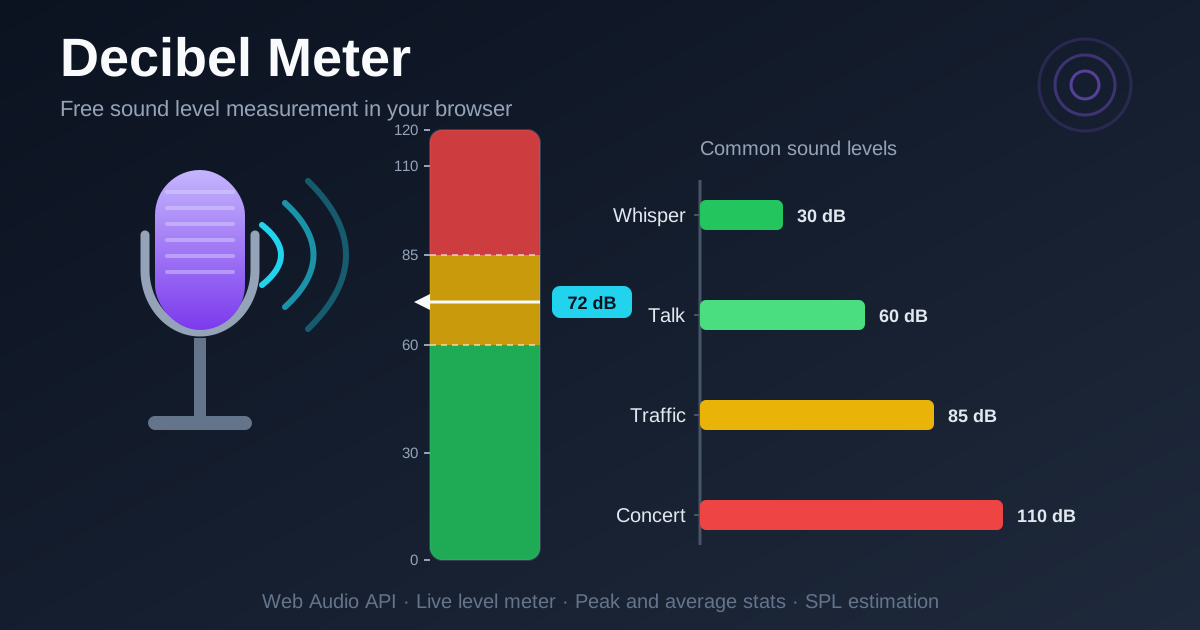
| Level meter bar | A vertical bar with green, yellow, and red zones so you can judge levels at a glance. |
| Peak, min and average | Records the loudest moment, the quietest moment, and the session average automatically. |
| SPL estimation | Converts the raw dBFS signal into an approximate SPL value using a calibration offset. |
| Microphone details | Displays the active device name and sample rate so you know exactly what you are measuring with. |
| Fully browser-based | Runs on the Web Audio API with no uploads, installs, or accounts. |
A few details worth knowing:
- The underlying measurement is the RMS (root mean square) level of the microphone signal, expressed in dBFS and then shifted by your calibration offset to estimate SPL.
- Statistics reset every time you start a new session, so each measurement begins from a clean slate.
- Stopping the meter freezes the final readings so you can note them down.
How to Use
- Open the tool and allow microphone access. Visit the Decibel Meter page and press start. Your browser will ask permission to use the microphone; grant it to begin. Nothing is recorded or stored.
- Position the device where it matters. Place your laptop or phone at the listening position: on the desk where you work, near the wall you suspect transmits noise, or where you normally sit.
- Watch the live level. The readout and the bar respond continuously. Speak, play music, or simply let the room stay quiet and observe where the value settles.
- Read the statistics. Note the peak (the loudest single moment), the minimum (the quietest), and the average (the most representative number for the session).
- Adjust the calibration offset if you have one. If you know your microphone needs a correction to read SPL accurately, enter it; otherwise leave the default, then compare your notes between locations.
Decibels Are Not Linear
This is the single most important concept for reading any decibel meter correctly.
The decibel scale is logarithmic, not linear. Every increase of 10 dB represents roughly a tenfold increase in acoustic power, and the human ear perceives it as approximately twice as loud. The jump from 60 dB to 80 dB is not a small step; it is one hundred times the sound energy.
That is why the reference points matter. Widely used approximations put a whisper near 30 dB, a normal conversation or quiet office near 60 dB, busy street traffic around 85 dB, and a loud concert near 110 dB. Hearing safety thresholds sit right in the middle of that range: OSHA limits workers to 90 dB averaged over an eight-hour shift, and NIOSH recommends 85 dB as the exposure limit, with the allowed time halving for every extra 3 dB. Prolonged exposure above these levels risks permanent, irreversible hearing damage, and at concert-level volumes the safe exposure window shrinks to minutes.
Now the honest caveat: your phone or laptop microphone is not a calibrated instrument. Consumer mics roll off at low levels, distort near the top of the range, apply automatic gain control, and vary between models. Treat the readings as reliable for relative comparisons — is this room louder than that one, did the fix reduce noise by 5 dB — but not as certified absolute SPL values. For legal or compliance work, check the tool against a Class 2 (or better) sound level meter and use the calibration offset to align them.
Practical Use Cases
Workspace Noise Checks
Open-plan offices commonly sit somewhere between 55 and 70 dB. Measure at your desk, then compare readings with the door closed, the fan off, or the HVAC adjusted. A session average gives you objective support when asking for a quieter corner, a meeting room, or noise-cancelling headphones.
Documenting Neighbor Noise
Keep the device in the same spot each night and log the peak and average. A record of repeated peaks from music or machinery gives you objective data for a polite conversation, a landlord report, or a building management complaint. Consistent relative readings over time are exactly what a browser meter does well.
Venue and Event Spot Checks
A quick reading near your seat tells you whether the concert, club, or motorsport event is running at 90 dB or 110 dB territory, so you can decide on earplugs.
Teaching Sound in the Classroom
Demonstrate the logarithmic scale live: whisper, talk normally, clap, and play music while students watch the numbers jump in predictable steps. Pair the meter with a tone generator to connect loudness with frequency experiments.
Best Practices
- Keep the device in the same position for comparisons. A reading at arm's length differs from one against a wall; consistency is what makes numbers comparable.
- Note your microphone and setup. The tool displays the active device and sample rate; keeping the same setup makes sessions comparable.
- Mind the physical limits. Consumer microphones are directional and tuned for voice, so expect reduced accuracy in wind or at extreme volumes.
- Protect your hearing above 85 dB. If the meter sits in the red zone, use hearing protection. Noise-induced damage is cumulative and permanent.
- Favor averages for characterizing a place. Peaks catch transients such as doors and shouts, but the average best describes sustained exposure.
- Treat absolute values as estimates. Trust relative comparisons between your own sessions, and calibrate against a reference meter before making absolute claims.
Ready to put a number on the noise around you? Open the free Decibel Meter, allow microphone access, and get a live sound level reading in seconds — entirely in your browser.
Related Tools You Might Like:
- Tone Generator — play reference tones to pair with your level measurements.
- Interval Timer — time repeated measurement sessions precisely.
- Dead Pixel Test — another quick hardware check that runs entirely in your browser.
Happy measuring!
Frequently Asked Questions
Q: Is the Decibel Meter accurate?
A: It is accurate for relative comparisons. Consumer microphones are not calibrated instruments, so treat absolute SPL values as estimates and use the calibration offset if you can compare against a reference meter.
Q: Is my audio uploaded anywhere?
A: No. The Web Audio API processes the microphone signal locally in your browser. No audio is recorded, stored, or transmitted.
Q: Why does my reading differ from a professional SPL meter?
A: Differences come from microphone sensitivity, automatic gain control, frequency response, and placement. Expect variation of several dB, but relative readings remain useful.
Q: What level is dangerous for hearing?
A: Long exposure above 85 dB carries risk, and OSHA caps occupational exposure at 90 dB averaged over eight hours. At concert-level volumes around 110 dB, damage can begin within minutes.