IMEI Checker: Validate 15-Digit IMEI Numbers and Decode the TAC
Validate 15-digit IMEI numbers with the Luhn checksum and decode TAC reporting body and serial info. Runs entirely in your browser.
Free Interactive Tool
IMEI Validator
Validate 15-digit IMEI numbers with the Luhn checksum and decode TAC, reporting body, and serial fields. Runs in your browser.
Table of Contents
Every GSM phone in the world carries a fingerprint that no factory reset can change: the IMEI, or International Mobile Equipment Identity. It is a 15-digit number burned into the device hardware at manufacturing time, and it uniquely identifies that specific physical handset for its entire life. Swap the SIM card, wipe the storage, install a new operating system — the IMEI stays exactly the same. Carriers use it to decide whether a device may join their network, insurers use it to register policies, and police use it to trace stolen hardware.
That persistence is exactly why the IMEI matters most when money changes hands. Buying a secondhand phone — on a marketplace, from a colleague, or at a repair shop — should always start with checking it. A mistyped or structurally invalid IMEI is an instant red flag: it can mean an innocent transcription error, or it can mean the number was altered to hide a stolen or blacklisted device. Yet most buyers have no idea how to tell a legitimate 15-digit number from a fabricated one, because doing it by hand requires a checksum algorithm that nobody wants to compute with pen and paper.
That is the gap our IMEI Checker fills. Paste in any 15-digit IMEI and the tool instantly runs the Luhn checksum, splits the number into its structural parts, decodes the TAC (Type Allocation Code) including the GSMA reporting body identifier, and shows a per-digit breakdown of how the verdict was reached. Everything runs entirely in your browser — no account, no upload, and no data ever leaves your device.
Why Use the IMEI Checker?
- Catch typos before they cost you — A single mistyped digit makes an IMEI fail the Luhn checksum. If a seller's number does not validate, something is wrong with the transcription at best, and with the device at worst. Two minutes of checking can save you from a worthless purchase.
- Understand what the digits actually mean — The checker does not just say "valid" or "invalid". It decodes the TAC so you can see the reporting body that allocated the number and the model and serial information embedded in the first eight digits. Unknown reporting body codes stay unlabeled rather than being guessed.
- Instant red-flag detection — Numbers that are the wrong length, contain letters, or fail the checksum are flagged immediately, with a clear explanation of which rule broke.
- Zero privacy risk — The tool is 100% client-side. Your IMEI is processed by JavaScript in your own browser and never transmitted to any server, which matters because an IMEI can be abused for device tracking if it leaks.
- A learning tool, not just a validator — The per-digit breakdown shows exactly how the Luhn algorithm doubles, sums, and verifies each position, making it useful for teaching, auditing, and debugging.
- Works with any IMEI source — Whether you read the number from the dialer code, the retail box, the SIM tray, or the settings menu, the checker handles the same 15-digit format everywhere.
Key Features
| Feature | What It Does |
|---|---|
| Luhn checksum validation | Doubles every second digit left to right, sums the results, and confirms the check digit is correct |
| TAC decoding | Splits the leading 8-digit Type Allocation Code from the unit serial and check digit |
| Reporting body identification | Maps the first two TAC digits to the GSMA reporting body; unknown codes stay unlabeled |
| Model and serial info | Surfaces the remaining TAC digits that encode model and allocation details |
| Per-digit breakdown | Shows each digit, which ones get doubled, and how the total is computed step by step |
| 100% client-side processing | All validation happens in your browser; nothing is uploaded, logged, or stored |
A few practical details worth knowing:
- No installation required — the checker is a web page, so it works the same on a laptop, a tablet, or the very phone you are inspecting.
- Free and unlimited — there is no quota, no sign-up, and no watermark; run it on one IMEI or on a spreadsheet's worth during an inventory audit.
- Transparent verdicts — every result shows its work, so you can defend a "reject this device" decision to a colleague or a seller with specifics instead of a bare yes or no.
How to Use the IMEI Checker
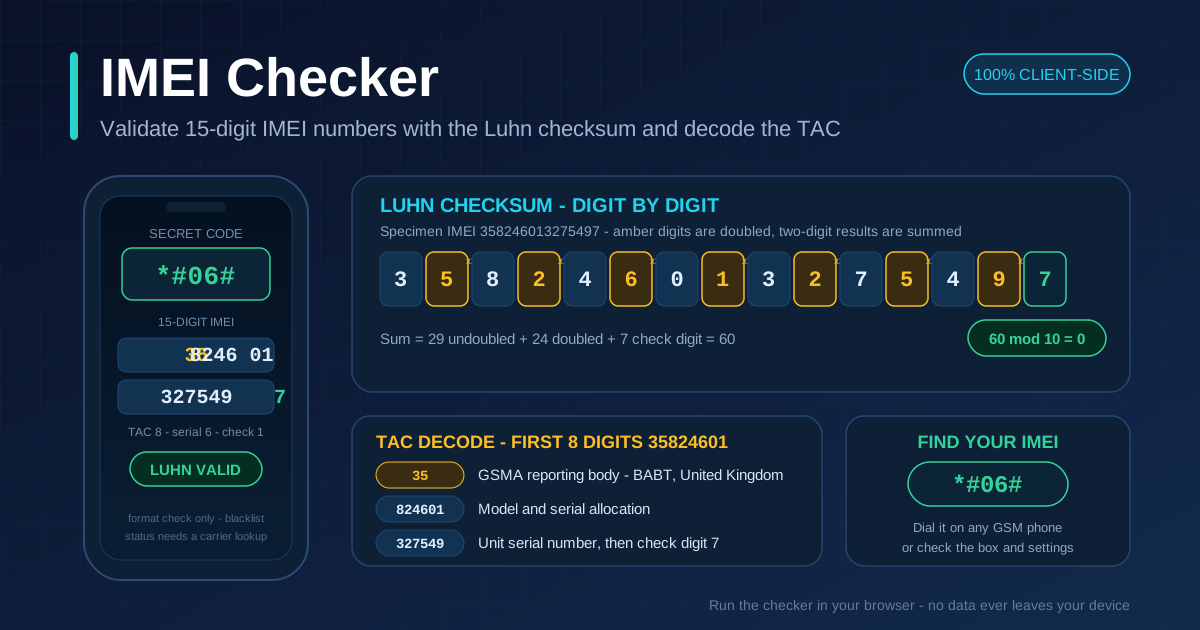
- Find the IMEI on the device — dial *#06# on the phone's keypad and the 15-digit IMEI appears on screen instantly. This universal code works on virtually every GSM handset, and it is the most trustworthy source because it reads the number straight from the firmware.
- Cross-check a second source — the retail box sticker (usually under a barcode labeled IMEI), the SIM tray engraving on some models, or the settings menu (iOS: Settings, General, About; Android: Settings, About phone) should all show the same digits.
- Open the IMEI Checker and paste or type the 15 digits into the input field. Formatting characters such as spaces or dashes can be removed as you go.
- Read the validation verdict — the tool confirms whether the number has exactly 15 digits and whether it passes the Luhn checksum. An invalid result pinpoints the failure immediately.
- Inspect the structural breakdown — review the decoded TAC, the reporting body for the first two digits, the model and serial portion, and the check digit to understand precisely what the number tells you about the hardware.
Luhn Checksum and the TAC: A Deep Dive
The IMEI looks like an arbitrary string of digits, but every position has a job. Understanding the two mechanisms inside it — the Luhn checksum and the Type Allocation Code — turns a random-looking number into a readable spec sheet.
How the Luhn Check Works
The final digit of the IMEI is a check digit computed with the Luhn algorithm, the same mod-10 scheme that protects credit card numbers. The procedure is simple:
- Take the first 14 digits and walk through them left to right.
- Double every second digit (positions 2, 4, 6, 8, 10, and 14). If doubling produces a two-digit number, add its two digits together — equivalently, subtract 9.
- Sum the doubled results and the untouched digits.
- The check digit (position 15) must bring the grand total up to the nearest multiple of 10. If it does, the number is Luhn-valid.
Here is a fully worked example using the specimen IMEI 358246013275497:
| Position | 1 | 2 | 3 | 4 | 5 | 6 | 7 | 8 | 9 | 10 | 11 | 12 | 13 | 14 | 15 |
|---|---|---|---|---|---|---|---|---|---|---|---|---|---|---|---|
| Digit | 3 | 5 | 8 | 2 | 4 | 6 | 0 | 1 | 3 | 2 | 7 | 5 | 4 | 9 | 7 |
| Doubled | — | 10 → 1 | — | 4 | — | 12 → 3 | — | 2 | — | 4 | — | 10 → 1 | — | 18 → 9 | — |
The untouched digits at positions 1, 3, 5, 7, 9, 11, and 13 sum to 3 + 8 + 4 + 0 + 3 + 7 + 4 = 29. The doubled positions contribute 1 + 4 + 3 + 2 + 4 + 1 + 9 = 24. Adding the check digit gives 29 + 24 + 7 = 60, and 60 divided by 10 leaves a remainder of 0 — so this IMEI passes the Luhn check. Change any single digit anywhere in the number and the remainder shifts, the total no longer divides evenly, and the checker rejects it. That sensitivity to one-digit errors is the entire point: it reliably catches typos and casual tampering.
Inside the TAC
The first eight digits form the Type Allocation Code (TAC), which is allocated by GSMA-approved reporting bodies:
- Digits 1–2: the reporting body identifier. The opening pair tells you which authority allocated the code — 35 points to BABT in the United Kingdom, 01 to the PTCRB in the United States, and 86 to the TAF in China, among others. The checker labels recognized bodies and deliberately leaves unknown codes unlabeled rather than inventing a guess.
- Digits 3–8: model and allocation info. The remaining six TAC digits encode the model and the allocation details assigned to that manufacturer and product line, which is why two handsets of the same model usually share a TAC prefix.
- Digits 9–14: the unit serial. These six digits are assigned by the manufacturer to distinguish this individual unit from every other unit built against the same TAC.
- Digit 15: the check digit that closes the Luhn loop described above.
What a Valid IMEI Proves — and What It Does Not
A Luhn-valid IMEI proves that the number is structurally well-formed: right length, right alphabet, internally consistent checksum. That rules out most transcription mistakes and the lazier fabrication attempts, because whoever altered the number had to recompute the check digit correctly.
It proves nothing about the device's history. A forged IMEI can be made Luhn-valid in seconds, and a perfectly valid, genuinely allocated IMEI can belong to a phone that was reported stolen last week. Format validity and blacklist status are separate questions. If a purchase decision matters, take the valid IMEI and check it against a carrier blacklist or an IMEI services database — those services hold the records our checksum tool intentionally does not pretend to have. The reverse logic is airtight, though: an IMEI that fails the checksum is a number that was mistyped or modified, and that alone is a reason to walk away.
Practical Use Cases
Buying a Secondhand Phone
This is the classic scenario. Before money moves, ask the seller to dial *#06# in front of you, run the number through the checker, and confirm the TAC looks consistent with the advertised model. A structurally invalid IMEI, a refusal to show the number, or digits that differ from the box sticker are all grounds to end the negotiation on the spot.
Inventory and Asset Management
IT departments and rental houses track hundreds of handsets, and the IMEI is the one identifier that survives wipes and SIM swaps. Validating IMEIs at intake — when devices arrive from procurement or return from an employee — keeps the asset register clean and surfaces data-entry errors while they are still cheap to fix.
Support Tickets and Repairs
A repair bench often receives a powered-off, water-damaged, or boot-looped phone whose model is unclear. Reading the IMEI from the SIM tray or the original box and decoding its TAC identifies the exact model and hardware generation without booting the device, which speeds up parts ordering and RMA paperwork.
E-Commerce Listing Quality Assurance
Marketplaces that allow phone listings can validate seller-submitted IMEIs as an automated QA step before publishing. Rejecting listings whose IMEIs fail the checksum filters out a large share of fraudulent or careless postings before any buyer ever sees them, and it costs nothing to run because validation is pure math.
Best Practices
- Checksum-valid is not the same as clean. Treat a passing Luhn check as the first filter, never the final verdict. Follow up with a carrier blacklist or GSMA IMEI database check for any purchase that matters.
- Always compare against *#06# physically. Type the number into the phone itself and watch the screen. A sticker can be reprinted; the firmware response cannot. All sources — dialer, box, settings — must agree digit for digit.
- Report stolen IMEIs. If you confirm a device was stolen, give the IMEI to the carrier and the police. The number only becomes a weapon against theft when it is on a blacklist.
- Do not buy when IMEIs disagree. A mismatch between the dialer and the box is a hallmark of swapped logic boards or refurbished-franked devices.
- Record your own IMEI today. Store it with your purchase receipt so that if your phone is ever lost or stolen, you can report it immediately without needing the physical device.
- Use the breakdown to educate. The per-digit view is an excellent way to teach new support staff or family members what they are actually looking at, rather than training them to trust a green checkmark blindly.
Start Checking IMEIs With Confidence
Fifteen digits are enough to hide a mistake, a fake, or a stolen handset — and enough to verify all three when you have the right tool. Open the IMEI Checker, paste any number you are about to trust, and read its structure in seconds, with every calculation staying private in your browser. The next time a secondhand deal looks too good to be true, let the checksum do the talking.
Related Tools You Might Like
- Thai ID Validator — validate Thai national ID numbers with their own checksum scheme, another structured-identifier check you can run in the browser.
- GTIN Validator — verify barcode numbers (EAN, UPC, ISBN) using the same family of mod-10 check digit math that protects IMEIs.
- Hash Type Identifier — identify MD5, SHA, and other hash formats from a string, a handy companion for security triage work.
Validate first, trust second — your future self will thank you.
Frequently Asked Questions
Q: Does the IMEI Checker tell me whether a phone is stolen?
A: No. The tool verifies the format — correct length, valid Luhn checksum, and a decoded TAC. Blacklist status lives in carrier and GSMA databases, so use the validated IMEI with a blacklist lookup service for that step. A valid format is a prerequisite, not a clean bill of health.
Q: What is the fastest way to find my IMEI?
A: Dial *#06# on the phone's keypad. The IMEI appears on screen immediately with no menu navigation. If the phone will not power on, read it from the retail box sticker or the SIM tray, or from the settings menu (About phone on Android, General then About on iOS) when it does boot.
Q: Can two phones have the same IMEI?
A: Legitimately manufactured phones never do — the IMEI is meant to be globally unique. If two devices report the same IMEI, one of them has been reprogrammed, which is illegal in many jurisdictions and grounds for immediate rejection.
Q: Why did my IMEI show as valid but the reporting body is unlabeled?
A: The checksum and length checks passed, but the first two TAC digits did not match any reporting body the tool recognizes. Rather than guessing, the checker leaves the code unlabeled — the number can still be structurally valid, and you can research the prefix separately.
Q: Is my IMEI sent to your servers when I use the tool?
A: Never. The IMEI Checker runs entirely in your browser with client-side JavaScript. The number never leaves your device, which is why the tool also works fine on internal hardware that policy forbids submitting to third-party websites.