Steganography Tool: Hide Secret Text Inside PNG Images with LSB
Hide secret text inside a PNG with LSB steganography and extract it back in your browser — no upload to a server. Learn how pixel-level data hiding works.
Free Interactive Tool
Image Steganography Tool
Hide secret text inside a PNG with LSB steganography and extract it back in your browser. Nothing is uploaded.
Table of Contents
Encryption is loud: sending an encrypted block announces that there is a secret worth reading. Steganography is quiet: it hides a message inside an ordinary-looking file so nobody even suspects it exists. Our Steganography Tool does exactly that with images: it embeds secret text into a PNG's pixels using LSB (least significant bit) steganography and extracts it back whenever you need it.
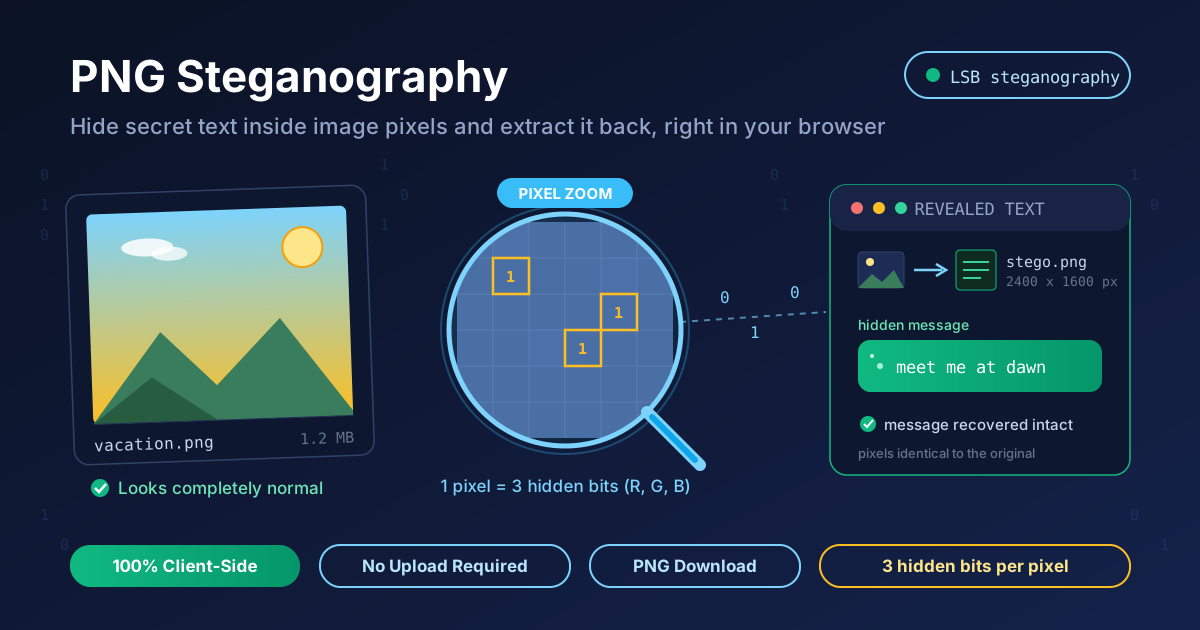
The workflow runs in your browser: load a PNG, type the text you want to hide, and the tool rewrites the least significant bits of its color channels. The picture looks identical, but the data is there. Load the saved image into reveal mode and the message returns intact. Nothing is uploaded, so neither image nor secret leaves your device.
This guide covers both modes, how LSB embedding works, how much text you can hide, and why PNG matters.
Why Use Steganography Tool?
- Nobody knows there is a message. A stego PNG looks like any ordinary image, unlike an encrypted blob that draws attention.
- 100% client-side processing. Embedding and extraction run in your browser — image and secret never leave your device.
- True LSB embedding. It modifies the least significant bit of each color channel — the classic steganography technique.
- One tool for both directions. Hide and reveal modes sit side by side, so you can verify your work in seconds.
- Capacity checking built in. Before touching a pixel, it confirms the image has room.
- No signup, no upload, no watermark. Free and unlimited, with a PNG download at full resolution.
Key Features
| Feature | Details |
|---|---|
| Modes | Hide (embed text) and Reveal (extract text) |
| Carrier format | PNG images — 24-bit RGB or 32-bit RGBA |
| Embedding method | LSB steganography, 1 bit per color channel |
| Capacity | 3 bits per pixel, validated before embedding |
| Output | Full-resolution stego PNG with direct download |
| Privacy | No upload, no server storage, no telemetry |
- Pixel-count guard. It compares capacity against message length and blocks embedding when the text would not fit, so secrets are never truncated.
- Resolution preserved. The stego PNG keeps the original dimensions and appearance.
- Zero-friction round trip. Hiding and revealing take seconds, so testing extraction is easy.
How to Use
- Open the Steganography Tool in your browser — no account or install needed.
- In Hide mode, load your carrier image. Pick a PNG with plenty of pixels — larger images hold more text.
- Type or paste your secret text. The tool checks capacity before modifying anything.
- Click embed and download the stego PNG. It looks unchanged, but your text now lives in its least significant bits — keep this file safe, as it is the only copy.
- To read it later, switch to Reveal mode, load the stego PNG, and extract — the text appears instantly.
How LSB Steganography Works
Every pixel in a PNG stores three numbers — R, G, and B — each from 0 to 255. A gray pixel might be (128, 128, 128), binary 10000000 per channel. The leftmost bits carry the color; the rightmost bit — the least significant bit — changes the value by exactly 1. Flip it and 128 becomes 129, a 1-in-255 difference the eye cannot see, especially when neighboring channels stay untouched.
The tool converts your message to binary and flips the last bit of one channel per bit — red, green, blue, then the next pixel. One ASCII character needs 8 bits, fewer than three pixels, so a short note vanishes without a trace.
The capacity math is simple: one bit per channel × three channels = 3 bits per pixel. A 1000×1000 image has 1,000,000 pixels, or 3,000,000 bits — about 375 KB of raw capacity, roughly 375,000 ASCII characters. That is a full chapter of text inside an image you could post anywhere.
PNG is lossless: every pixel value written comes back exactly. JPEG is lossy — compression reshapes neighboring values and discards the low-order detail where your bits live. Convert a stego PNG to JPEG, screenshot, resize, or crop it, and the message is destroyed. Keep the file as PNG, byte for byte.
One caveat: LSB embedding is not encryption. Anyone who suspects hidden data can extract it in seconds — steganography hides the existence of a message, not its contents. Encrypt first: run text through Text Encryptor, then hide the ciphertext, so an attacker needs the suspicion and the key.
Practical Use Cases
Watermarking and ownership marking
Embed a copyright note or license string in a distributed image. Unlike a visible watermark, an LSB mark does not alter the composition, and it survives casual copying — extract it later to prove provenance.
CTF challenges and teaching
CTF forensics challenges often rely on LSB steganography, and this tool is the fastest way to solve or build them. In a classroom, students watch a message vanish into pixels and return, making binary concepts tangible.
Sharing notes inside images
Hide a reminder or a short message in a picture you are already sending, and tell the recipient to extract it. Anyone glancing at the image sees only a photo; the recipient sees the payload.
Privacy-aware communication
Where encrypted traffic draws scrutiny, a plain-looking PNG carries a message that never appears as text on the wire. Pair it with encryption, and deliver the original file directly, since platforms may recompress uploads.
Best Practices
- Encrypt before you hide. LSB hiding is obfuscation, not protection. Run secrets through Text Encryptor first, then embed the ciphertext.
- Keep the file as PNG end to end. Never convert to JPEG, and avoid screenshots, resizing, or cropping — each destroys the bits.
- Track original versus stego copies. Rename the output clearly and store both, so you never confuse the carrier with the extraction file.
- Leave capacity headroom. Don't fill an image to 100% of capacity; staying well below the limit keeps changes harder to detect.
- Test extraction before sharing. Always reveal the message from your downloaded stego PNG to confirm the round trip worked.
- Know the limits. Steganography hides existence, not meaning. Combine it with real encryption and a safe key channel.
Hide Your First Secret Message Today
A picture may be worth a thousand words, but with the right tool it can carry hundreds of thousands — invisibly. The Steganography Tool handles LSB hiding and extraction in one client-side page: load a PNG, type a message, download the stego image, reveal it whenever you like. No upload, no account, no trace.
Try a short note first, then test the capacity. Once your text emerges from an image that looks untouched, you will see why steganography has fascinated researchers for decades.
Related Tools You Might Like:
- Text Encryptor — encrypt your message before embedding it, so hidden data stays confidential even if it is found.
- PII Redactor — strip names, emails, and other personal data from text before you hide or share it.
- Hash Type Identifier — identify unknown hash strings, a handy companion when inspecting data recovered from CTF images.
Happy hiding!
Frequently Asked Questions
Q: Will hiding text change how the PNG looks? A: No. LSB embedding alters each color channel by at most 1 out of 255 — a difference the eye cannot perceive. Resolution and appearance stay identical.
Q: What happens if I convert the stego PNG to JPEG or resize it? A: The hidden message is destroyed. JPEG compression and resizing rewrite low-order pixel bits, exactly where the data lives. Keep and send the stego file as PNG.
Q: Is steganography the same as encryption? A: No. Encryption scrambles a message so it cannot be read; steganography hides that a message exists. For confidentiality, encrypt first, then embed the ciphertext.
Q: How much text can I hide in one image? A: Roughly 3 bits per pixel — about 375 KB in a 1000×1000 PNG. Small images hold very little, so check capacity first.
Q: Does the tool upload my image or message to a server? A: Never. Hiding and extraction run in your browser, so image and secret stay on your device throughout.