ISSN Validator Guide: Check ISSN-8 Checksums and Convert to EAN-13 Barcodes
Validate ISSN-8 checksums with full X check digit support and convert between ISSN and ISSN-EAN-13 (977) barcode numbers with the free client-side ISSN Validator.
Free Interactive Tool
ISSN Validator
Validate ISSN-8 checksums and convert between ISSN and ISSN-EAN-13 (977 prefix). Runs entirely in your browser with no data sent anywhere.
Table of Contents
Every serial publication in circulation carries an International Standard Serial Number. Journals, magazines, newspapers, and annual proceedings all share the same eight-character identifier, and the systems that index them — library catalogs, citation databases, academic portals — expect it to be letter-perfect. One transposed digit turns a clean record into a phantom title no catalog can resolve. The free ISSN Validator catches exactly that kind of silent failure before it spreads.
The tool does two jobs in one screen. First, it validates the ISSN-8 checksum — the mod-11 style guard digit ending every ISSN, including the less common X check digit. Second, it converts both ways between the plain ISSN and its ISSN-EAN-13 barcode form, the 13-digit number starting with 977 that appears on barcoded periodical covers. Everything runs 100% in your browser, so no number you paste ever leaves your machine.
This guide covers how the tool works, the mathematics behind the check digit, and the workflows where it saves the most time.
Why Use the ISSN Validator?
- Instant checksum verification: Paste any number and immediately see valid or invalid, plus the check digit the math requires.
- X check digit support: About one valid ISSN in eleven ends in X. The tool treats X as the value 10 instead of a typo.
- Two-way barcode conversion: Turn an ISSN into its ISSN-EAN-13 (977 prefix) form for barcoded covers, or recover the ISSN from a scanned EAN-13.
- Flexible input handling: Hyphenated, spaced, or concatenated input all work, so copied metadata rarely needs cleanup first.
- Completely private: All computation is client-side; numbers from unpublished titles never touch a server.
- Free and unlimited: No account, no quota — validate one number or a whole import batch.
Key Features
| Feature | What It Does |
|---|---|
| ISSN-8 validation | Recomputes the mod-11 checksum over the first 7 digits and compares it with digit 8 |
| X check digit | Accepts X as the check digit when the computed value is 10 |
| ISSN to EAN-13 | Builds 977 + 7 ISSN digits + 2-digit issue number, then appends the EAN-13 check digit |
| EAN-13 to ISSN | Extracts the 7 core digits from a 977-prefixed barcode and re-derives the ISSN-8 check digit |
| Format modes | Auto-detect, forced ISSN-8, or forced ISSN-EAN-13 |
| Client-side only | Every calculation happens in the browser; nothing is uploaded |
Two details matter: the 2-digit issue enumeration distinguishes individual issues (the tool defaults it to 00 for serial-level barcodes), and the reverse conversion recomputes the mod-11 digit from scratch, catching barcodes mistyped during scanning or entry.
How to Use
- Open the tool. Navigate to the ISSN Validator.
- Paste a number. Enter an ISSN such as 0378-5955 or an EAN-13 such as 9770378595002; hyphens and spaces are stripped automatically.
- Choose a format mode. Keep Auto to detect the format from length and prefix, or force ISSN-8 / ISSN-EAN-13 when you already know.
- Read the result. A valid number shows the normalized hyphenated form and its computed check digit; an invalid one fails the checksum.
- Copy what you need. Grab the normalized ISSN or the full EAN-13 for records, labels, or templates.
The ISSN Check Digit and Its Barcode Form
How the mod-11 checksum works
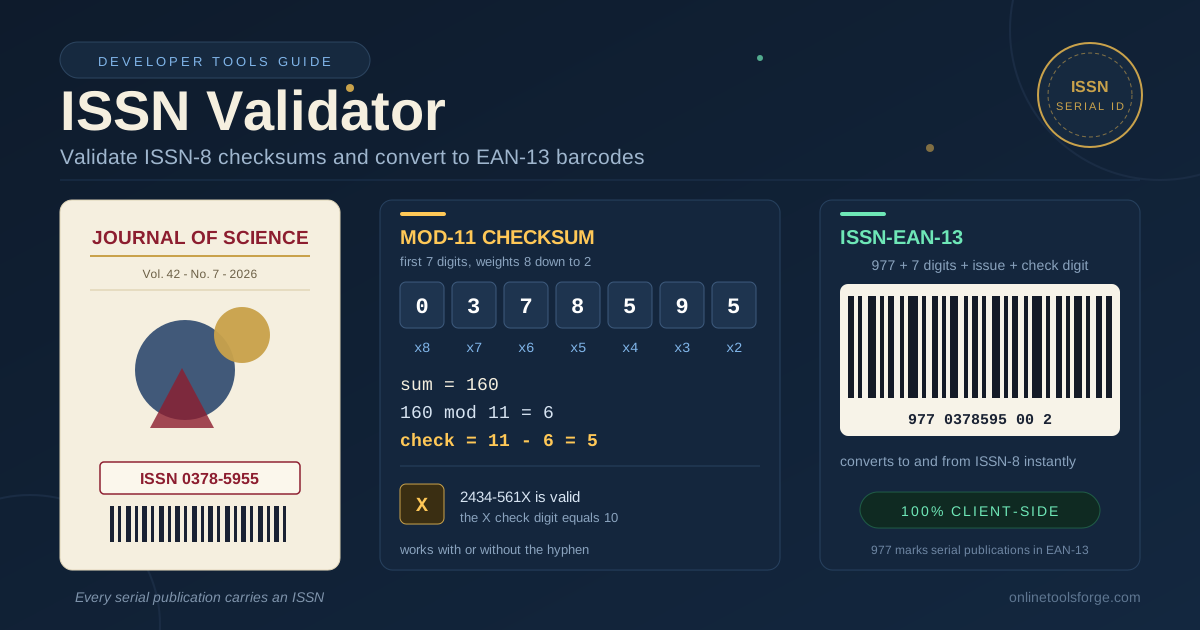
An ISSN has eight characters: seven digits plus a check digit. Each of the first seven is multiplied by a weight from 8 down to 2, left to right. The products are summed and divided by 11. A remainder of 0 gives check digit 0, a remainder of 1 gives X (the value 10), and otherwise the check digit is 11 minus the remainder.
Worked example with 0378-5955:
| Digit | 0 | 3 | 7 | 8 | 5 | 9 | 5 |
|---|---|---|---|---|---|---|---|
| Weight | 8 | 7 | 6 | 5 | 4 | 3 | 2 |
| Product | 0 | 21 | 42 | 40 | 20 | 27 | 10 |
The sum is 160. Since 160 mod 11 = 6, the check digit is 11 - 6 = 5, matching the printed final digit — the ISSN is valid. Now try 2434-561X: its weighted sum is 122, leaving remainder 1, so the check digit is X. A digit-only validator would wrongly reject this real ISSN.
Converting ISSN to EAN-13
Barcoded journal covers use a 13-digit number built from the ISSN: the 977 prefix reserved for serial publications, the 7 core ISSN digits, a 2-digit issue enumeration, and an EAN-13 check digit computed with alternating 1 and 3 weights over the first 12 digits. For 0378-5955 with issue 00, the result is 9770378595002. Scanners cannot read an ISSN directly, so publishers imprint this EAN-13 form; the validator produces it in one click and reverses it just as reliably.
ISSN vs ISBN
The two identifiers are often confused. An ISSN identifies a continuing resource — the journal as a whole — and stays the same across every issue; it is 8 digits with a mod-11 check digit and can end in X. An ISBN identifies a specific book edition, runs 13 digits, and uses the 978/979 EAN prefix with a different scheme. A number starting with 977 describes a serial; 978 or 979 describes a book.
Practical Use Cases
Journal Publishing Workflows
Editorial teams can verify the masthead ISSN before each issue goes to press and hand the barcode house a correct EAN-13. Catching a bad digit at layout time costs seconds; catching it after a print run costs a reprint.
Library Catalog Ingestion
Catalogers loading vendor records can spot-check field 022 values in bulk. An ISSN that fails the mod-11 test almost always contains a transcription error, and fixing it before ingestion prevents duplicate or unresolvable holdings.
Citation Manager Data Hygiene
Reference libraries accumulate ISSNs from PDFs, spreadsheets, and imports of varying quality. Running stored numbers through the validator flags corrupted entries so exports carry identifiers that actually resolve.
Academic Portal Forms
Submission systems that ask authors for the journal ISSN can validate on entry, stopping mistyped identifiers at the source instead of during manual review weeks later.
Best Practices
- Keep the hyphenated display form (1234-5678) in human-facing documents, and store 8 clean characters in databases.
- Validate at entry, not at export. Checking when a number is first typed is far cheaper than auditing later.
- Register with your ISSN centre before printing barcodes. The tool verifies math, but only the ISSN International Centre issues genuine numbers.
- Treat the 2 issue digits in EAN-13 as data. Confirm whether your partner expects 00, a sequence, or custom enumeration.
- Re-check numbers copied from scanned covers. OCR errors swap digits the checksum catches immediately.
- Pair ISSN and title checks. A valid checksum proves the string is well-formed, not that it belongs to the intended journal.
Validate Your Next ISSN in Seconds
Open the ISSN Validator, paste a number, and get a definitive answer with the correct check digit and barcode form. It is free, private, and fast enough for an entire import batch.
Related Tools You Might Like:
- GTIN Validator — verify EAN/UPC product barcodes, including the 1-3 weighted check digit used by ISSN-EAN-13.
- IMEI Checker — validate 15-digit mobile device identifiers with the Luhn algorithm.
- JSON Formatter — clean and inspect structured metadata records that carry ISSN fields.
Happy validating!
Frequently Asked Questions
Q: What is the difference between an ISSN and an ISBN? A: An ISSN identifies a continuing resource such as a journal and is the same for every issue, while an ISBN identifies one specific book edition. ISSNs are 8 digits with a mod-11 check digit; ISBNs are 13 digits using the 978/979 prefix.
Q: Why do some ISSNs end in the letter X? A: X is a legitimate check digit representing the value 10. It appears whenever the weighted sum of the first seven digits leaves remainder 1 when divided by 11, so a number such as 2434-561X is perfectly valid.
Q: Is the ISSN-EAN-13 number the same as an ISBN barcode? A: No. ISSN-EAN-13 numbers start with the 977 prefix and identify serial publications, while book barcodes use 978 or 979, with different middle blocks and check-digit calculations.
Q: Does the ISSN Validator upload or store the numbers I paste? A: No. All validation and conversion logic runs entirely in your browser with client-side JavaScript, so nothing is transmitted to or stored on a server.