GTIN Validator: Verify EAN, UPC and GTIN Check Digits Instantly
Validate GTIN-8, GTIN-12 (UPC-A), GTIN-13 (EAN-13) and GTIN-14 check digits, decode the packaging indicator digit, and identify the GS1 prefix country. 100% client-side.
Free Interactive Tool
GTIN / UPC / EAN Validator
Validate GTIN-8, GTIN-12, GTIN-13, and GTIN-14 barcodes with checksum verification, packaging indicator decoding, and GS1 prefix lookup. 100% client-side.
Table of Contents
Every product on a store shelf carries a number that has to be exactly right: the GTIN printed beneath its barcode. These codes fail silently: one mistyped digit still looks plausible, yet it can bounce a marketplace listing, misdirect a scanner, or corrupt an inventory file. Our GTIN Validator catches such errors in seconds, before any of that happens.
The tool validates all four GTIN lengths — GTIN-8, GTIN-12 (better known as UPC-A), GTIN-13 (EAN-13), and GTIN-14 — against the GS1 mod-10 checksum, decodes the packaging indicator digit on GTIN-14 carton codes, and identifies the GS1 prefix country or company region the number was assigned in.
Like every tool we build, it runs entirely in your browser: nothing is uploaded, nothing is logged, and no sign-up is required.
Why Use GTIN Validator?
- Catch typos before they cost money — A transposed digit passes the eye test but fails the checksum, so validation belongs at the point of entry.
- Handle all four lengths in one place — GTIN-8, GTIN-12 (UPC-A), GTIN-13 (EAN-13), and GTIN-14 share one algorithm; there is no mode switch.
- Understand the number, not just its validity — Decode the GTIN-14 packaging indicator and map the GS1 prefix to its country or company region.
- Get instant, zero-friction feedback — Results appear as you type, with no account and no rate limit.
- Keep sensitive catalogs private — Processing is 100% client-side, so codes from unreleased SKUs never leave your device.
Key Features
| Feature | What It Does |
|---|---|
| Four-length validation | Checks 8, 12, 13, and 14-digit codes against the GS1 mod-10 checksum |
| Check digit verdict | A clean pass, or a precise failure message when the code cannot be valid |
| Packaging indicator | Decodes the leading digit of GTIN-14 into its packaging hierarchy level |
| GS1 prefix lookup | Maps leading digits to the member organisation and its country or region |
| Accessible interface | Screen reader announcements and full keyboard support for every interaction |
- One algorithm, four code families. GS1 built every GTIN length around the same mod-10 checksum, so one validator covers EAN-8, UPC-A, EAN-13, and ITF-14 without special cases.
How to Use GTIN Validator
- Open the tool. Navigate to the GTIN Validator page.
- Paste or type a code. Any GTIN-8, GTIN-12, GTIN-13, or GTIN-14 works; stray spaces and dashes are cleaned automatically.
- Read the verdict. A valid check digit passes immediately; an invalid one reports the checksum failure.
- Review the decode. Check the packaging indicator on GTIN-14 codes and the prefix region on any code.
- Repeat as needed. The tool is stateless — paste, read, clear, repeat.
The GS1 Mod-10 Check Digit
Every GTIN ends with a check digit computed with the GS1 mod-10 algorithm. Starting from the rightmost data digit, multiply digits by alternating weights of 3, 1, 3, 1, moving leftward. Add the products, then pick the check digit that brings the total to the next multiple of ten (zero if it already is one).
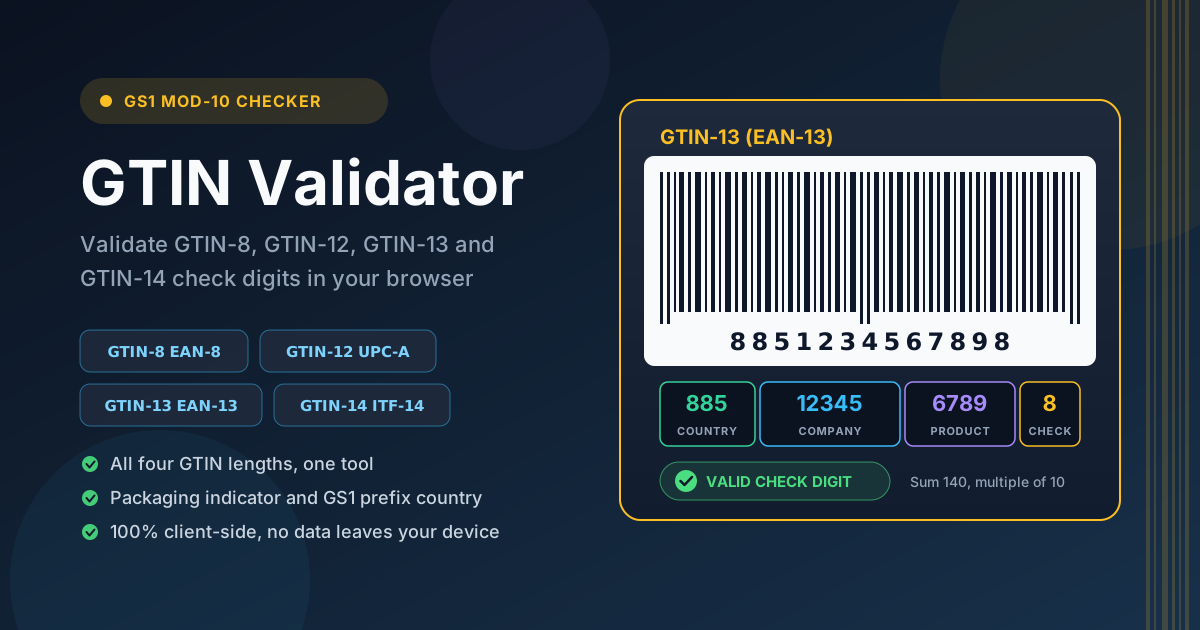
A worked example makes this concrete. Take the first twelve digits of a GTIN-13: 885123456789. Weighing from right to left gives 9×3 = 27, 8×1 = 8, 7×3 = 21, 6×1 = 6, 5×3 = 15, 4×1 = 4, 3×3 = 9, 2×1 = 2, 1×3 = 3, 5×1 = 5, 8×3 = 24, and 8×1 = 8. The sum is 132; the next multiple of ten is 140, so the check digit is 8 and the valid GTIN-13 is 8851234567898. Change any single digit and the sum can no longer reach a multiple of ten — which is why the checksum catches single-digit errors and most transpositions.
The Four GTIN Lengths and Their Aliases
The four lengths are one standard at different levels, each with familiar aliases: GTIN-8 (EAN-8) for tiny retail packages; GTIN-12 (UPC-A), the original North American code most shoppers call a "UPC"; GTIN-13 (EAN-13), the worldwide default for consumer trade items, including 978 and 979 ISBN-13 book codes; and GTIN-14 (ITF-14, historically SCC-14) for shipping cartons. GS1 treats them as one 14-digit space: a GTIN-13 becomes a GTIN-14 with a leading zero, checksum unchanged.
The Packaging Indicator Digit on GTIN-14
The first digit of a GTIN-14 is the packaging indicator. Zero marks the consumer unit itself — what you get when a 13-digit code is zero-padded to fourteen. Digits 1 through 8 describe successive carton levels, from innermost case (1) to outermost container (8), so every carton level gets its own scannable identity tied to the same base item. Digit 9 is reserved for variable-measure goods.
What the GS1 Prefix Tells You — and What It Does Not
The leading two or three digits identify the GS1 member organisation that issued the company prefix: 000–019, 030–039, and 060–139 for the United States and Canada; 45 and 49 for Japan; 690–699 for China; 880 for India; 885 for Thailand. Ranges like 020–029 and 200–299 are restricted to in-store use with no global uniqueness. The critical caveat: a prefix indicates where the number was assigned, not where the product was made. A brand registered in Thailand can manufacture in Vietnam yet carry an 885-prefixed code. Use the prefix to spot suspect data — never as a country-of-origin claim.
Practical Use Cases
E-commerce Product Feed Validation
Marketplaces validate GTINs before accepting listings, and a failed check digit is among the most common rejection reasons. Run the identifier column of your feed through the validator before every upload — catching three bad codes out of five thousand takes minutes, while discovering them through rejection emails takes days.
Retail Inventory Onboarding
Supplier barcodes are often the first product data to enter an inventory system. Validating codes at goods-in prevents one mistyped GTIN from silently cross-linking two unrelated products — an error that can propagate for months.
Printing Barcode Labels
If you print your own shelf or case labels, verify the human-readable number before rendering it as bars. The Barcode Generator turns a verified number into a clean symbol. Validate first, print second — reprinting labels is pure waste.
ERP and Spreadsheet Data Hygiene
GTINs live long lives inside ERPs, PIMs, and spreadsheets, where imports and manual edits slowly corrupt them. A quarterly audit through the validator flushes out corruption while the fix is still a data patch, not a physical relabel of stock.
Best Practices
- Validate at the point of entry, not after import. The cheapest place to fix a bad GTIN is the keyboard it was typed on.
- Keep numbers as strings in spreadsheets. Excel and Google Sheets strip leading zeros from GTIN-8 and GTIN-12 codes, or display long values in scientific notation. Format the column as text first.
- Distinguish check-digit-valid from officially assigned. A passing checksum proves only that the code is well-formed; only GS1-licensed prefixes guarantee global uniqueness.
- Normalise before you store. Strip spaces and dashes and pick one canonical format, such as the zero-padded 14-digit form.
- Log rejected codes with their source. A supplier whose sheets fail repeatedly has a process problem worth fixing upstream.
- Treat restricted prefixes as non-unique. 02xx and 2xxx codes may repeat between retailers; keep them out of global catalogs.
Start Validating Your Product Codes Today
A product identifier is only useful if it is right, and the GS1 checksum makes "right" verifiable in a keystroke. Whether you are cleaning a feed, onboarding a supplier, or printing case labels, the GTIN Validator gives an instant, private verdict on any GTIN. Paste a code now and see what your numbers are telling you.
Related Tools You Might Like:
- Barcode Generator — Turn validated GTINs into clean, scannable barcode symbols for labels and packaging.
- Barcode Decoder — Scan a barcode image and read back the encoded digits to cross-check printed labels.
- IMEI Checker — Validate mobile device IMEI numbers with the same family of Luhn-style checksum logic.
Happy validating!
Frequently Asked Questions
Q: What is the difference between GTIN-13 and EAN-13?
A: None at all. EAN-13 is the historical name for the 13-digit retail code, UPC-A for the 12-digit North American version. GS1 unified the terminology under the GTIN umbrella; the validator accepts them interchangeably.
Q: Can a code pass the check digit and still be invalid?
A: Yes. The checksum proves only that the code is mathematically well-formed. It says nothing about whether the prefix is licensed or the reference actually issued. Validation is a first filter, not a guarantee of official assignment.
Q: Why does my spreadsheet drop the leading zero from GTIN-8 and GTIN-12 codes?
A: Spreadsheets treat a cell of digits as a number, and numbers drop leading zeros. Format the column as plain text, or prefix entries with an apostrophe.
Q: Does the GS1 prefix tell me where a product was manufactured?
A: No. The prefix identifies the member organisation that assigned the number, usually the country where the brand owner registered. Manufacturing frequently happens elsewhere, so a prefix is never a country-of-origin indicator.
Q: Is any data uploaded when I validate a code?
A: No. The tool runs entirely in your browser — 100% client-side. Codes are processed on your device and never sent to any server.