Vision Screen Test: Check Your Eyesight at Home with a Calibrated Snellen Chart and Amsler Grid
Vision Screen Test turns any display into a calibrated eye-checking station, pairing a Snellen acuity chart and Amsler grid with contrast-sensitivity rows and clear guidance on when to see an eye doctor.
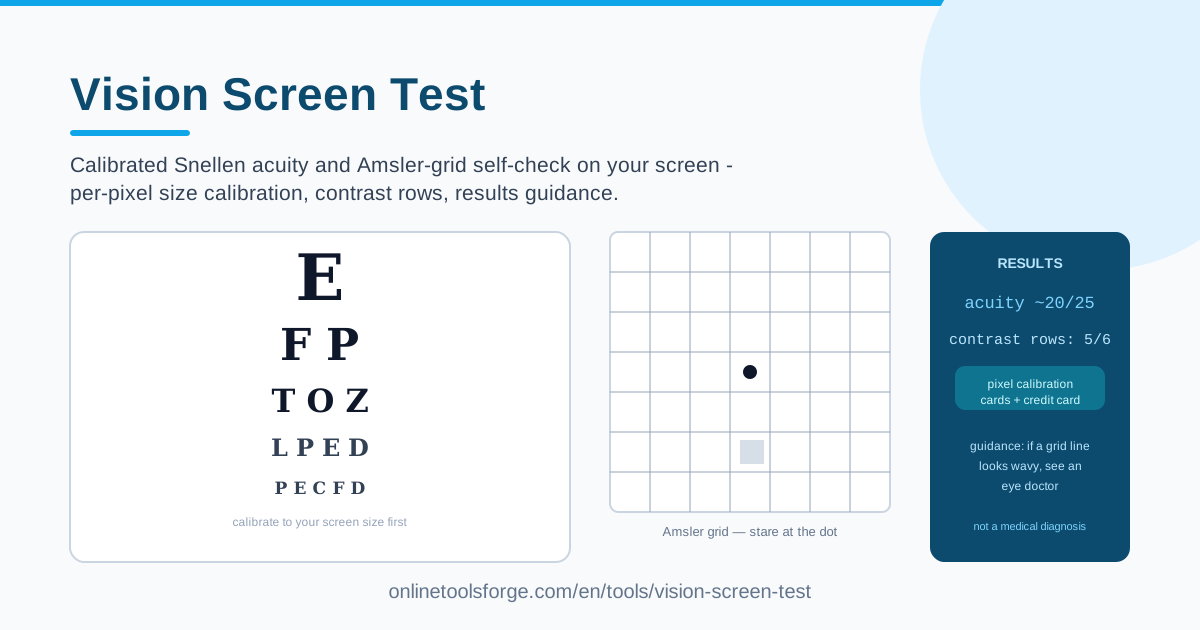
Table of Contents
Most of us spend the better part of every day staring at screens. Vision changes rarely announce themselves — you just lean a little closer to the monitor without noticing. A professional exam is still the gold standard, but between visits you can keep tabs on your eyesight with the Vision Screen Test, a free browser tool that runs a calibrated Snellen acuity chart and an Amsler-grid self-check on any display you own.
What separates this tool from random eye-test images online is calibration. Before testing, you match an on-screen reference against a standard credit card, which tells the tool the exact physical size of your pixels. Every letter row and grid is then drawn at true-to-life dimensions, so your results actually mean something.
This guide covers how to run the test properly, what each chart measures, and how to read your results.
Why Use Vision Screen Test?
- It takes about five minutes. A quick acuity and central-vision check used to mean a clinic visit; now it runs in your browser whenever you want.
- Calibration makes results meaningful. The credit-card sizing step ensures letters and grids render at real physical sizes on your screen, not arbitrary ones.
- Two classic tests in one tool. The Snellen chart measures sharpness while the Amsler grid screens central vision — the area most affected by conditions like macular degeneration.
- Contrast-sensitivity rows go beyond sharpness. Faint, low-contrast letters challenge your eyes differently than bold black-on-white rows — both are included.
- Guidance you can act on. Instead of a bare score, you get plain-language context and clear advice on when to see an eye doctor.
- It runs on any display. Laptop, desktop monitor, or tablet — if you can hold a credit card against it, you can test.
Key Features
| Feature | What it does |
|---|---|
| Calibrated Snellen chart | Renders letter rows at true physical size, so viewing distance maps to a meaningful acuity estimate. |
| Per-pixel size calibration | Uses a credit-card-sized reference to work out the exact dimensions of your screen's pixels. |
| Amsler-grid self-check | Shows the standard grid for spotting wavy lines, distortions, or blind spots in central vision. |
| Contrast-sensitivity rows | Adds progressively fainter letter rows to test vision beyond pure sharpness. |
| Results guidance | Interprets your performance and flags when a professional exam is worth booking. |
| Works on any display | Runs on laptops, desktops, and tablets with no installation or account. |
Calibration separates a genuine screening tool from a decorative chart picture: without it, a "normal-sized" letter on a 27-inch monitor could be half that size on a smaller screen, silently skewing results.
It takes under a minute: hold a card against the on-screen reference, adjust until they match, and the tool derives your true pixel density.
How to Use Vision Screen Test
- Calibrate with a card. Grab any standard credit, debit, or ID card — they share one size standard worldwide. Hold it against the on-screen reference and adjust until the two match exactly.
- Stand at the right distance. Snellen charts assume a specific viewing distance, typically a few meters from a monitor. The tool tells you the distance it expects.
- Read the Snellen rows. Start with both eyes open and read down the rows as far as you comfortably can. The smallest row you read accurately is your baseline.
- Do the Amsler grid with each eye. Cover one eye, fixate on the grid's center, and check that every line looks straight and evenly spaced. Repeat with the other eye — one-sided distortion deserves particular attention.
- Read the guidance. The results panel summarizes what your performance suggests and when to schedule a professional exam.
What the Charts Check
Snellen acuity and the 20/20 notation. The fraction is a comparison. 20/20 means that at 20 feet you read what a standard-vision person reads at 20 feet; 20/40 means you must stand at 20 feet to read what that viewer reads at 40 — the bigger the second number, the lower your acuity. Rows below 20/20 show your eyes resolving finer detail than the standard.
Why calibration matters — pixel size honesty. A Snellen chart is only as valid as the physical size of its letters, and a browser has no idea how big your pixels are until you tell it. The credit-card reference solves this because payment cards are the same size everywhere. Skip it and the same chart can flatter you on one monitor and fail you on another.
Amsler grid and central-vision warning signs. The grid is a square of straight lines with a central dot. Conditions affecting the macula — the retina's center — often show up first as wavy lines, blurred patches, dark areas, or missing squares. Because your two eyes cover for each other, testing each eye separately makes the check genuinely useful.
Contrast-sensitivity rows. Sharpness is not the whole story of seeing. Recognizing a face in a dim restaurant or gray text on a gray page depends on contrast sensitivity. Fainter rows reveal losses a high-contrast chart misses, and they often shift earlier in conditions such as cataracts.
The not-a-diagnosis boundary. This is a screening aid, not a medical device. It cannot measure your prescription, check eye pressure for glaucoma, or inspect your retina. A comfortable pass does not replace an exam, and a missed row does not prove something is wrong — the guidance points you toward professional care when signals warrant it.
Practical Use Cases
A screen-time eye checkup habit
If you work at a computer all day, add a quick check to your monthly routine. A two-minute run makes slow drift visible instead of something you discover when subtitles become unreadable.
Monitoring between annual eye exams
If you already see an optometrist yearly, the tool fills the months in between. Comparing results against your last prescription shows whether your vision is holding steady or quietly changing — useful context for your next appointment.
Contact lens sanity check
When things look blurry, the usual suspects are a dirty or expired lens. Run the test with contacts in, then with glasses on — a clear difference is a concrete data point instead of a vague feeling.
Family vision awareness
Children squinting at the television and older relatives with macular-degeneration risk both benefit from a regular, low-pressure check. A household habit turns eye health into a normal topic rather than a late discovery.
Best Practices
- Test with your corrected vision on. Wear glasses or contacts; for an uncorrected baseline, run it separately and note the difference.
- Use good, even lighting. Dim rooms and screen glare degrade performance and make healthy eyes look worse than they are.
- Always test one eye at a time. Binocular vision hides one-sided problems, which is exactly what the Amsler grid is meant to catch.
- Keep your setup consistent. Same display, same distance, similar time of day — that consistency makes comparisons meaningful.
- Do not squint or guess. Straining for one more row defeats the purpose; record only what you genuinely see.
- Always confirm with a professional. Any sudden change, distortion, or blind spot warrants prompt professional attention, whatever the screen showed.
Your eyes process more screen time in a week than previous generations saw in a year, and a five-minute check costs almost nothing. Open the Vision Screen Test, calibrate with a card, and find out where you stand today.
Related Tools You Might Like:
- Camera Tester — check your webcam feed, resolution, and frame rate before your next call.
- Motion Sensor Tester — check that your device's motion sensors respond as expected.
- Microphone Tester — record and play back your voice to confirm your mic works properly.
Take care of your eyes!
Frequently Asked Questions
Q: Is an online vision screen test accurate? A: As a screening estimate, yes — provided you calibrate carefully and keep the correct distance. It is not a diagnosis: only a professional exam can measure your prescription and inspect your eye health.
Q: What does 20/20 vision actually mean? A: It means at 20 feet you read letters a standard-vision person also reads at 20 feet. 20/40 means you need to be closer for the same detail, while 20/15 beats the standard.
Q: What should I do if the Amsler grid lines look wavy or some squares are missing? A: Note which eye was affected and contact an eye care professional promptly. Central-vision distortion — especially in one eye only — should never be ignored.
Q: How often should I run the Vision Screen Test? A: About once a month suits most people, plus any time you notice new symptoms. It complements, never replaces, comprehensive eye exams.